
Before you start
Turn on Bluetooth on your laptop. Update Windows/macOS/ChromeOS to the latest version. Charge the case and buds to at least 20%. For AirPods Pro 3, enter pairing by double-tapping the front of the case until the status light flashes white – there’s no back setup button anymore
Connect on Windows 11/10
- Open Settings > Bluetooth & devices > Add device > Bluetooth.

- Open the AirPods case with both buds inside. Double-tap the front of the case until the light flashes white.

- Select “AirPods Pro 3” from the device list, then click Connect.
- In Sound settings, choose “Headphones (AirPods Pro 3 Stereo)” for music and “Headset (Hands-Free)” for calls if shown.
- Optional: Set them as the default audio and communications devices.


If the pair screen never shows: Close the lid 20 seconds, open it, double-tap again, and try Add device one more time. For a full reset, see the section below.
Connect on a MacBook (macOS Tahoe or later)
- Open the case with buds inside next to your Mac.
- Double-tap the front of the case until the status light flashes white and follow the on-screen prompt.
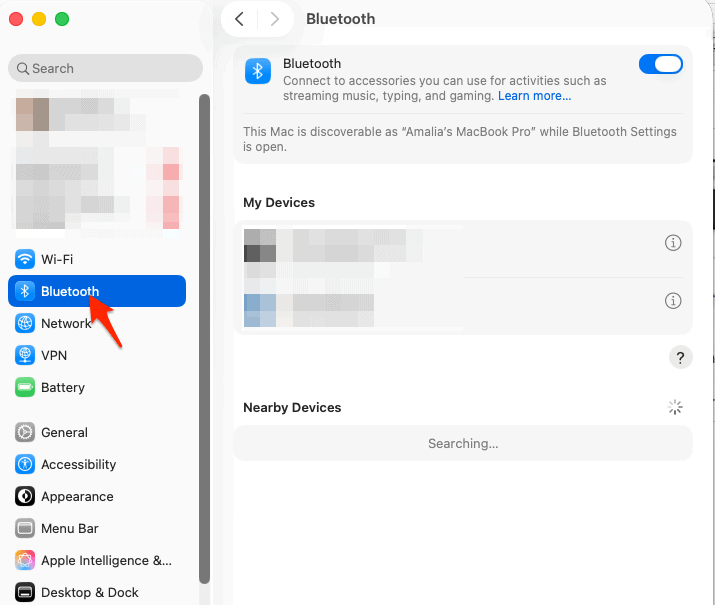
- If no prompt appears, open System Settings > Bluetooth, find “AirPods Pro 3,” and click Connect.
- Signed into iCloud? Your AirPods will auto-appear on your other Apple devices too.

Tip: If you upgraded from older AirPods, remove the old profile in Bluetooth settings to prevent switching conflicts.
Connect on Chromebook
- Click the Quick Settings tray > Bluetooth > + Pair new device.
- Open the case, double-tap the front until the light flashes white.
- Choose “AirPods Pro 3” from the list.
Note: You’ll get SBC/AAC audio and ANC works on-device, but platform-specific features (Personalized Spatial Audio settings, Live Translation triggers, etc.) require Apple platforms.
Connect on Linux or other laptops
Open your Bluetooth manager, start scanning, then double-tap the case front until white flashes and choose “AirPods Pro 3.” If your stack supports AAC, enable it for better quality.
Switch between devices
AirPods don’t do classic multipoint on non-Apple laptops. To move from phone to laptop, disconnect on the previous device first, then connect on the new one. On Apple gear under your Apple ID, Automatic Switching can hand off audio between iPhone, iPad, and Mac once paired.
Reset AirPods Pro 3 (fixes most pairing issues)
- Put both buds in the case and close the lid for 30 seconds.
- Open the lid. Double-tap the front of the case three times: once when the light is on, again when it flashes white, and a third time when it flashes faster.
- When the status light flashes amber then white, set up again on your laptop.
Quick fixes if Windows won’t connect
- Remove stale entries: Settings > Bluetooth & devices > Devices, remove any old “AirPods” entries, then pair fresh.
- Toggle Bluetooth radio: Turn Bluetooth off and on, or run
ms-settings:bluetoothvia Win+R. - Reboot Bluetooth services: In Device Manager, disable/enable your adapter; install any OEM driver updates.
- Avoid USB 3.0 interference: Move the laptop away from 2.4 GHz dongles and routers during pairing.
- Reset and retry: Use the reset steps above, then Add device again.
Related troubleshooting: [AirPods not showing up on Bluetooth] on Mac Observer.
Feature notes for AirPods Pro 3 on laptops
- New pairing gesture: Double-tap the front of the case to enter pairing – different from older models with a back button.
- ANC works everywhere: Noise cancellation and Transparency run on the buds, so they work on Windows/ChromeOS too.
- Apple-only extras: Setup cards, Personalized Spatial Audio tuning, and Live Translation triggers are designed for Apple devices.
- What’s new this generation: Better ANC, heart-rate sensing, improved mic quality, and longer battery life.
Tips
- Rename the headset in Bluetooth settings so you can spot it fast in multi-device lists.
- On Windows, set the “Stereo” profile for music apps to avoid telephony compression.
- Keep firmware up to date by occasionally connecting to an Apple device; updates install automatically when charging.
FAQs
Yes, you need the case to enter pairing on first setup.
You’ll get stereo with ANC; Apple’s personalized Spatial Audio features are Apple platform features. Some apps offer their own virtual spatial modes separately.
The status light on the case flashes white after you double-tap the front.
Summary (steps)
- Open laptop Bluetooth settings and choose Add device.
- Open AirPods Pro 3 case with buds inside.
- Double-tap the front of the case until the light flashes white.
- Select “AirPods Pro 3” and finish pairing.
- If issues persist, reset by triple double-tap and pair again.


Work, thanks.